One component
MCP · skillConnect an MCP server, then copy a skill into your agent’s skill folder. Skills supply instructions; MCP servers supply tools.
clio-kit skill install dataset-explore --target .agents/skills
CLIO Kit is the meta-marketplace for scientific computing. Add one MCP server, a skill or a whole workflow to Claude Code, Codex, Clio Coder or OpenCode, then check the results against your data.
Install in one line
uv tool install 'clio-kit>=2.11.0'
uvx --from 'clio-kit>=2.11.0' clio-kit mcp-servers
Runs the launcher without installing it.
npx skills@1.5.25 add iowarp/clio-kit --skill dataset-explore --agent codex --copy
Skills only, with Node.js 22.20 or newer. Use --skill '*' for every skill.
git clone https://github.com/iowarp/clio-kit.git && cd clio-kit && uv tool install --editable .
git clone https://github.com/iowarp/clio-kit.git && cd clio-kit
Then ask your agent: “Read setup.md and set up CLIO Kit for me.”
Need uv? curl -LsSf https://astral.sh/uv/install.sh | sh
01 / From a question to a checked result
CLIO Kit gives your agent scientific tools and the procedures for using them. You choose what to connect, and every tool call stays visible for review.
Find research, inspect data, create figures or run cluster jobs. Install the components your task needs.
A skill describes the order of operations, scientific assumptions and checks. A plugin brings related components together.
Follow the tool calls. Check source references, data coverage, job status or output files against the task’s expected result.
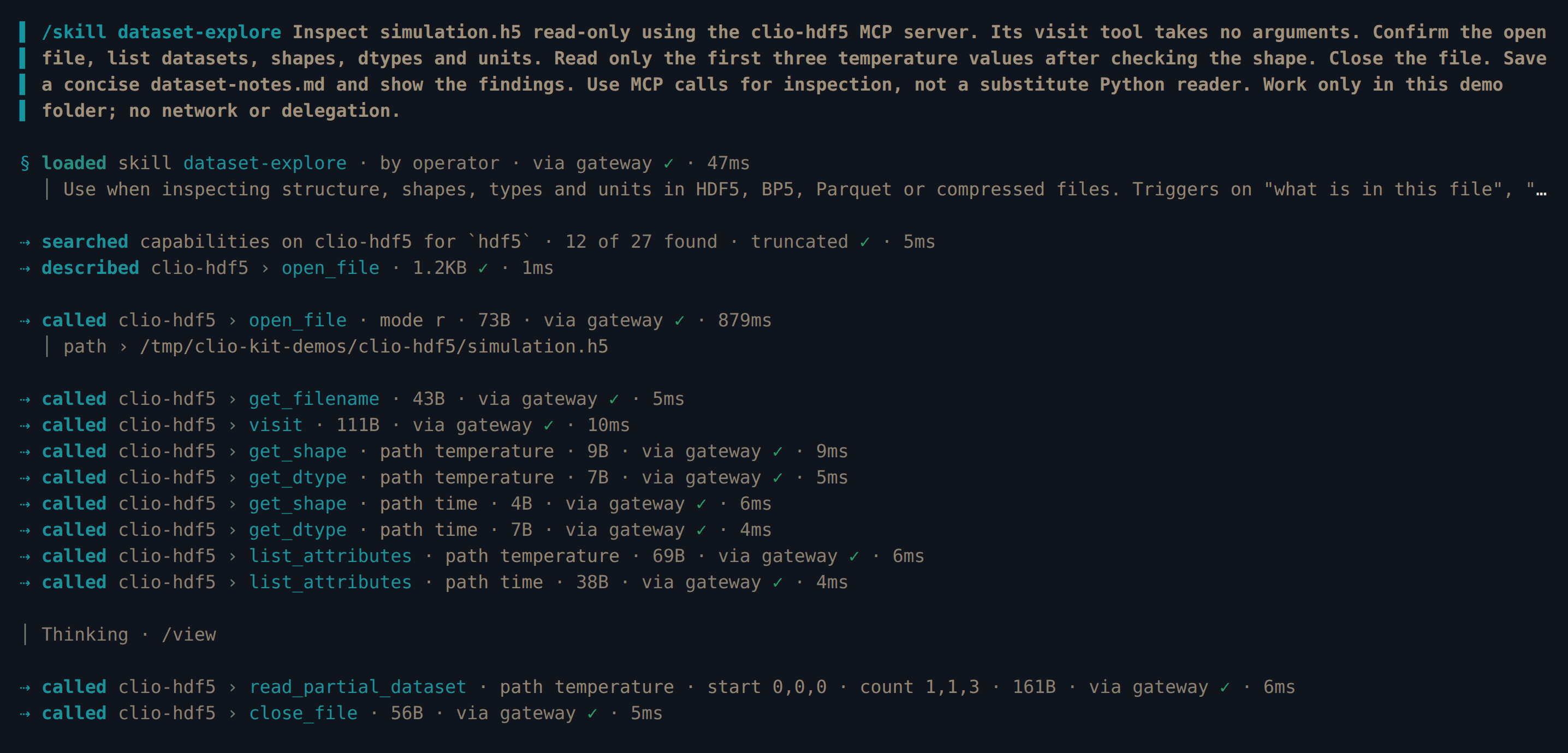
“Summarize these experiment results. Check units and missing values, compare the runs, and explain what the data supports.”
Choose a hands-on tutorial →02 / Two ways to build your toolkit
Choose a single capability or install a plugin for the task. The same launcher runs every MCP server.
Connect an MCP server, then copy a skill into your agent’s skill folder. Skills supply instructions; MCP servers supply tools.
clio-kit skill install dataset-explore --target .agents/skills
A workflow plugin groups the servers and skills a task needs. One command writes the MCP configuration and copies the skills.
clio-kit plugin install clio-scientific-io --client codex --project .
03 / Your agent, your environment
Components install into your project in each client’s own format. Every hands-on tutorial is recorded in four of them.
Connect your agent →Need an agent? Clio Coder is IOWarp’s open-source coding agent for scientific software. Every tutorial here includes a Clio Coder session.
Try Clio Coder ↗04 / Tools and knowledge for your research
Servers and skills for papers, datasets, cluster jobs, figures and I/O analysis.
Inspect HDF5, ADIOS and Parquet files. Read a bounded slice before working with a large dataset.
02Clean tables, calculate statistics and plot results with Pandas, Plot and ParaView.
03Connect to software environments, Slurm jobs and performance tools on your HPC system.
04Find papers, build bibliographies and discover datasets for your research.
05Work with geographic features, terrain, seismic waveforms and event catalogues.
06Investigate I/O behavior, search large logs and interpret performance measurements.
07Add reusable procedures, scientific planning and guidance for interpreting results.
08Bring related MCP servers, skills and supported agents or hooks together for a task.
09Share your own components or index an external plugin or marketplace.
05 / Install
You need uv and an agent. Add a workflow plugin, a single MCP server or a skill; each downloads only what it needs.
uv tool install 'clio-kit>=2.11.0'
git clone https://github.com/iowarp/clio-kit.git
cd clio-kit
uv tool install --force --reinstall --editable ".[verification]"
clio-kit plugin install clio-scientific-io --client codex --project .
A workflow plugin writes its MCP configuration and copies its skills. For other agents, use --client with claude-code, opencode, cursor, antigravity or vscode.
clio-kit mcp-servers
clio-kit mcp-server hdf5
List the servers, then add the clio-kit mcp-server command to your agent’s MCP settings. The first start builds the server’s environment; some servers need system software or site access.
clio-kit skill list
clio-kit skill install dataset-explore --target .agents/skills
Use your agent’s skill folder, such as .claude/skills for Claude Code. Give --bundle clio-scientific-io instead of a name to install a workflow’s skills.
clio-kit plugin fetch clio-dataset-report --target ./clio-selected
claude plugin marketplace add "$PWD/clio-selected"
claude plugin install clio-dataset-report@clio-kit
Native Claude Code plugins can also include agents and hooks.
Find names in the catalogue.
Follow your agent’s setup guide, then try a tutorial with sample data.
06 / Questions
No. Choose individual components or a workflow. Released distributions download only the components you select. See installation options.
Yes, if it supports the component you want to use. MCP servers and portable skills work in Claude Code, Codex, Clio Coder, OpenCode and other clients. Native plugin agents and hooks depend on the host. Check your client’s setup.
CLIO Kit’s own components and plugins from other publishers’ repositories and marketplaces, in one catalogue. Indexed code and releases stay with their authors. Meet the publishers.
Add a component or plugin here, or index a package you maintain elsewhere. Build, test and contribute a plugin.
It proves the server responds. Backend setup, data access and scientific correctness still need checking. Read the validation guide.

Part of the IOWarp platform
Try a workflow on data you know and inspect the result.
Built by researchers, for researchers, at Illinois Institute of Technology with NSF support.