Contribute 6 min read
Build, test and contribute a plugin
Package a skill with an MCP, test it in Claude Code, Codex, Clio Coder and OpenCode, and share it through the community catalogue.
- Written for
- CLIO Kit 2.11
- Works in
- Claude Code · Codex · Clio Coder · OpenCode
- Basis
- Recorded sessions · 7 Oct 2026
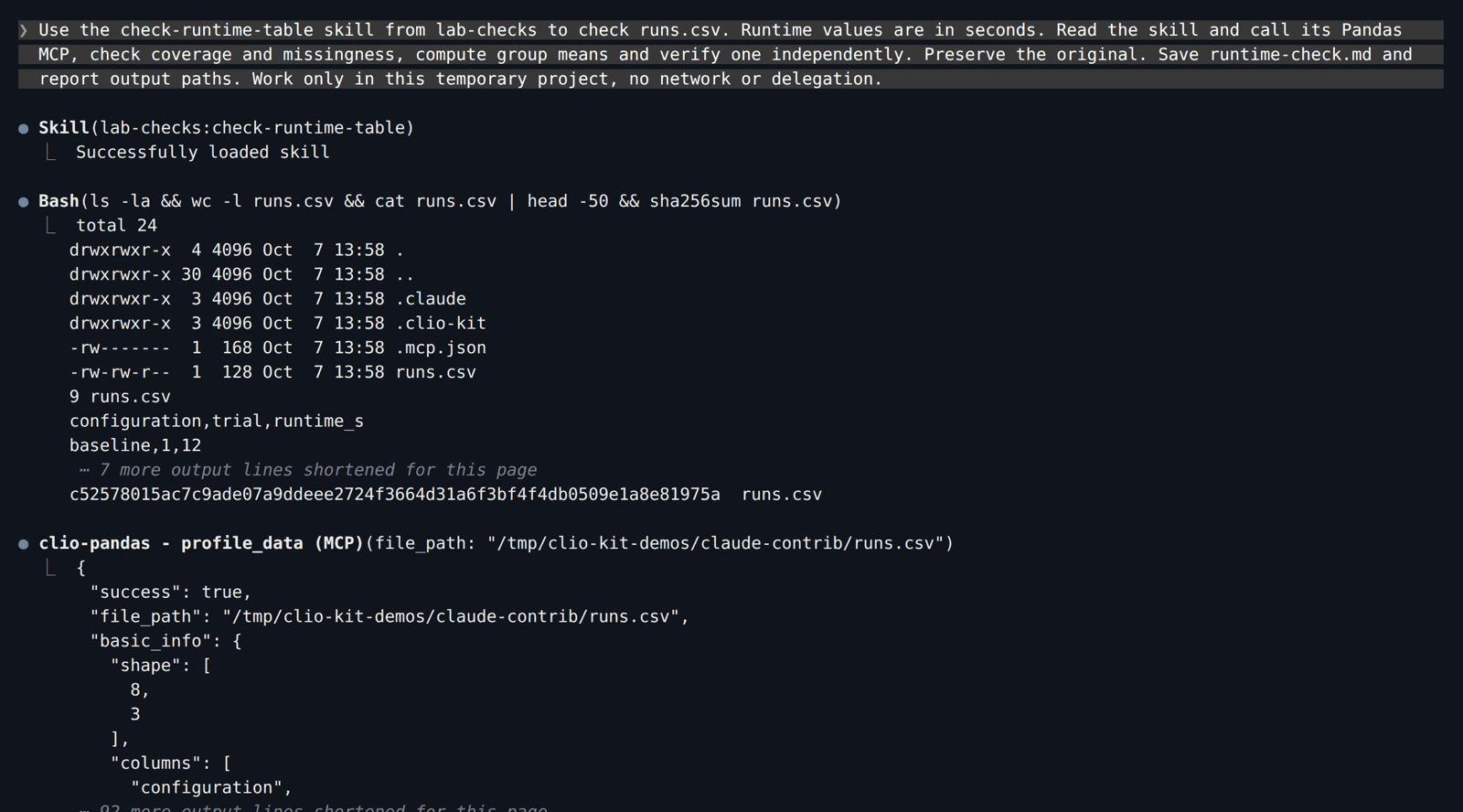
This walkthrough packages a small check-runtime-table skill with the Pandas MCP. It shows the same package used as a native Claude Code plugin and as portable components in Codex, Clio Coder and OpenCode. All four sessions were run for this guide with the versions listed in Explore an HDF5 file; they produced the same checked group means from the same input.
1. Start with the tested package
Install the CLIO Kit launcher. Create a new directory and download lab-checks.zip into it:
mkdir contribution-demo
cd contribution-demo
unzip lab-checks.zip
The archive contains only these authoring files:
.claude-plugin/marketplace.json        # local test index
plugins/lab-checks/
├── .claude-plugin/plugin.json        # name, description, author, version
├── .mcp.json                         # starts the clio-pandas MCP
└── skills/check-runtime-table/
    ├── SKILL.md                      # when and how to check the table
    └── evals.md                      # expected behavior on example inputs
To scaffold your own package from scratch, use clio-kit plugin init plugins/my-plugin, then replace its sample content. The download above is the
finished package used in the two sessions below, not an installed marketplace
contribution. Its local test index lets Codex resolve it before you open a PR.
2. Read and adapt the skill
The included skill requires configuration, trial and runtime_s, checks
coverage and missing values before grouping, retains the tool's output file, and
asks for one independently checked mean. It preserves input files and stops when
a required column or MCP is missing.
Keep that scope narrow. Set an accurate trigger in the YAML description, document
the required MCP, and provide an expected result in evals.md. Replace the
manifest's tutorial author and description before contributing your own package.
The MCP configuration is a normal stdio entry:
{
  "mcpServers": {
    "clio-pandas": {
      "command": "clio-kit",
      "args": ["mcp-server", "pandas"]
    }
  }
}
A skill-only contribution can omit the MCP entry. Hook and agent packages require host-specific checks; use the authoring guide for those formats.
3. Validate the package
clio-kit plugin validate plugins/lab-checks
claude plugin validate plugins/lab-checks --strict
Both validators passed for the downloaded package. They check structure, not whether its procedure produces a scientifically correct result.
Create a fresh test project outside contribution-demo for each client you
try. Put a copy of runs.csv in it and keep an untouched copy for
comparison.
4. Run it in your client
Use /absolute/path/to/contribution-demo for the folder you unzipped.
- Claude Code
- Codex
- Clio Coder
- OpenCode
Load the package as a native plugin for one session:
claude --plugin-dir /absolute/path/to/contribution-demo/plugins/lab-checks
Enable the plugin's MCP server, then ask:
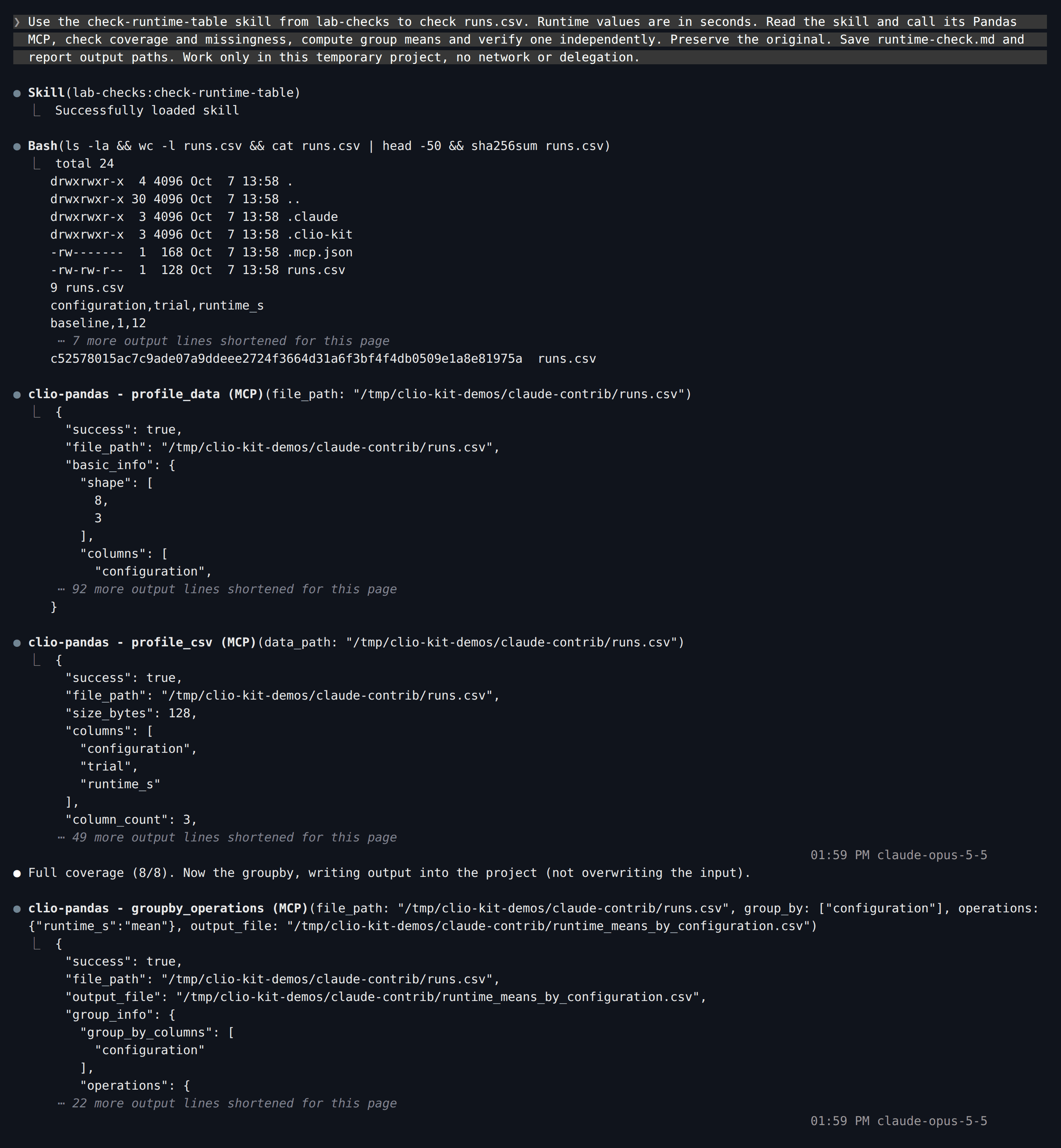
Use the check-runtime-table skill from lab-checks to check runs.csv. Runtime values are in seconds. Read the skill and call its Pandas MCP, check coverage and missingness, compute group means and verify one independently. Preserve the original. Save runtime-check.md and report output paths. Work only in this temporary project, no network or delegation.
Claude loads lab-checks:check-runtime-table; the namespaced prefix shows the
skill comes from the plugin. It then calls the plugin's Pandas MCP:
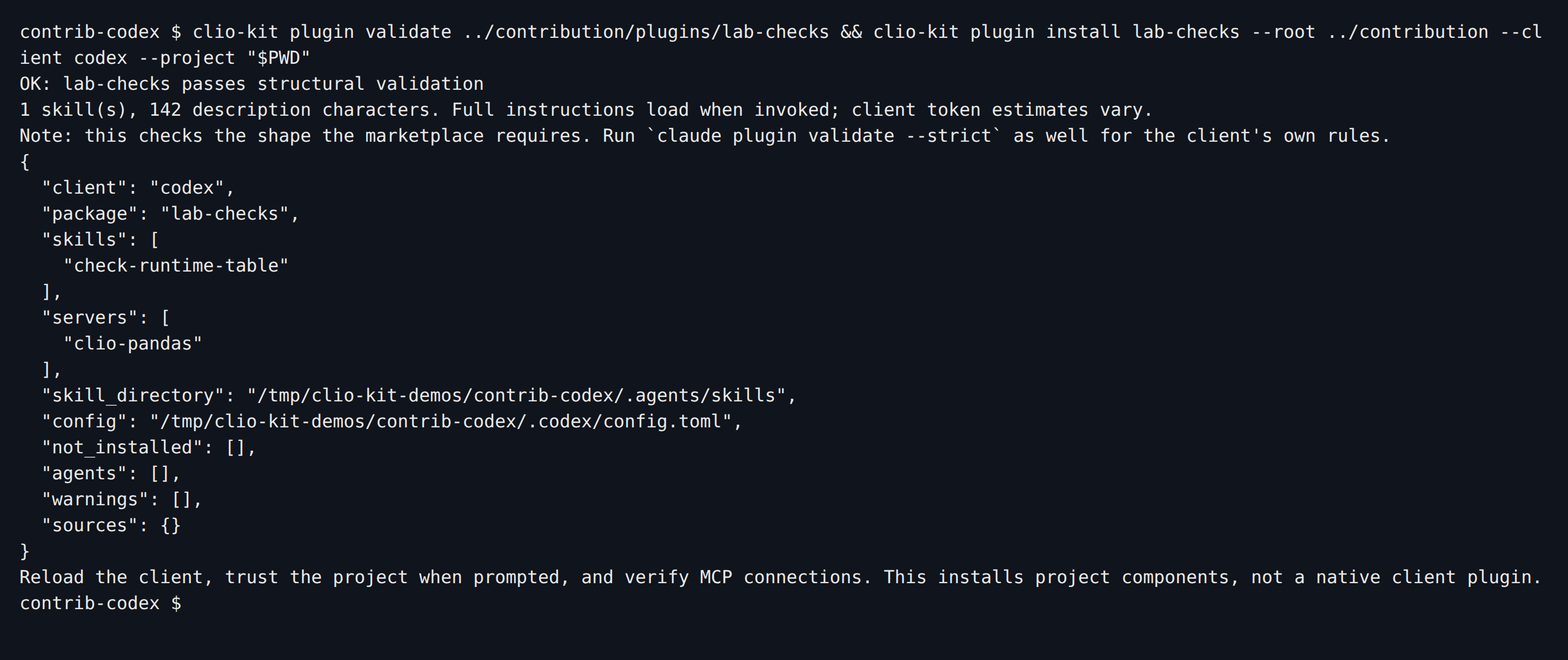
Install the package's portable components; this is not a native Claude plugin inside Codex:
clio-kit plugin install lab-checks \
  --root /absolute/path/to/contribution-demo --client codex --project "$PWD"
codex
Ask:
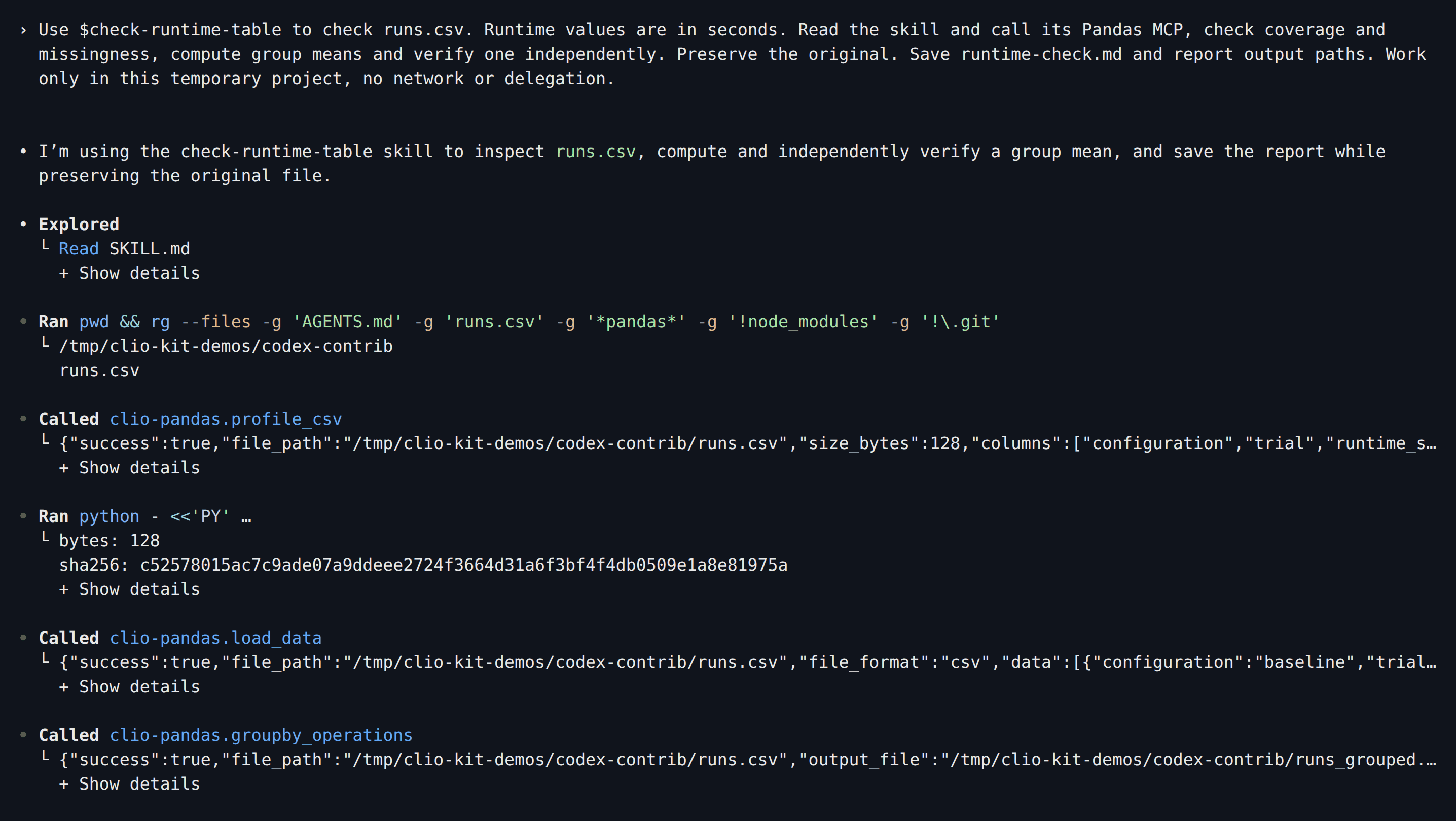
Use $check-runtime-table to check runs.csv. Runtime values are in seconds. Read the skill and call its Pandas MCP, check coverage and missingness, compute group means and verify one independently. Preserve the original. Save runtime-check.md and report output paths. Work only in this temporary project, no network or delegation.

Copy the skill folder into the project's loose skills and declare the Pandas
server in .clio-coder/mcp.yaml:
mkdir -p .clio-coder/skills
cp -r /absolute/path/to/contribution-demo/plugins/lab-checks/skills/check-runtime-table .clio-coder/skills/
version: 1
servers:
  - id: clio-pandas
    command: clio-kit
    args: [mcp-server, pandas]
    timeoutMs: 120000
clio-coder mcp trust clio-pandas
clio-coder
Ask:
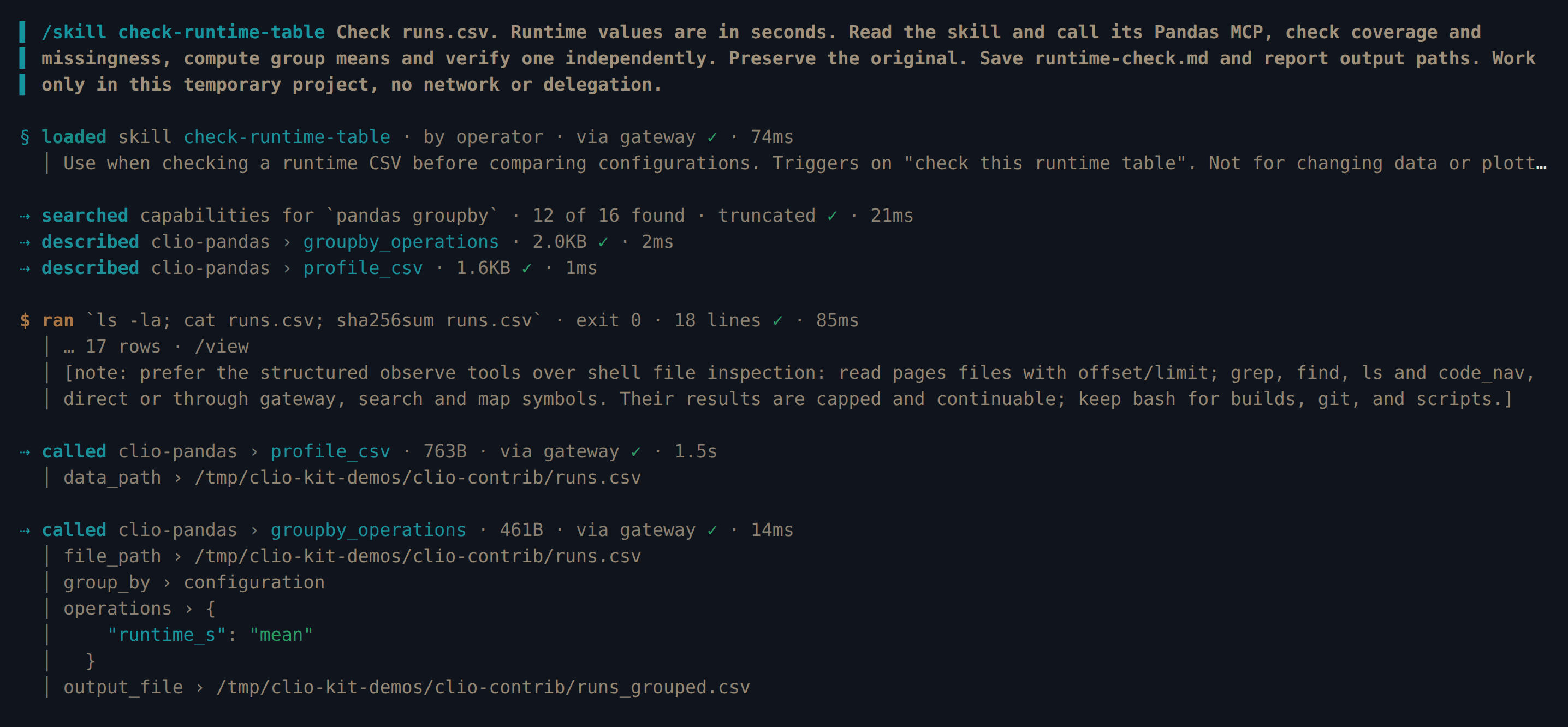
/skill check-runtime-table Check runs.csv. Runtime values are in seconds. Read the skill and call its Pandas MCP, check coverage and missingness, compute group means and verify one independently. Preserve the original. Save runtime-check.md and report output paths. Work only in this temporary project, no network or delegation.
clio-kit plugin install lab-checks \
  --root /absolute/path/to/contribution-demo --client opencode --project "$PWD"
opencode
Ask:
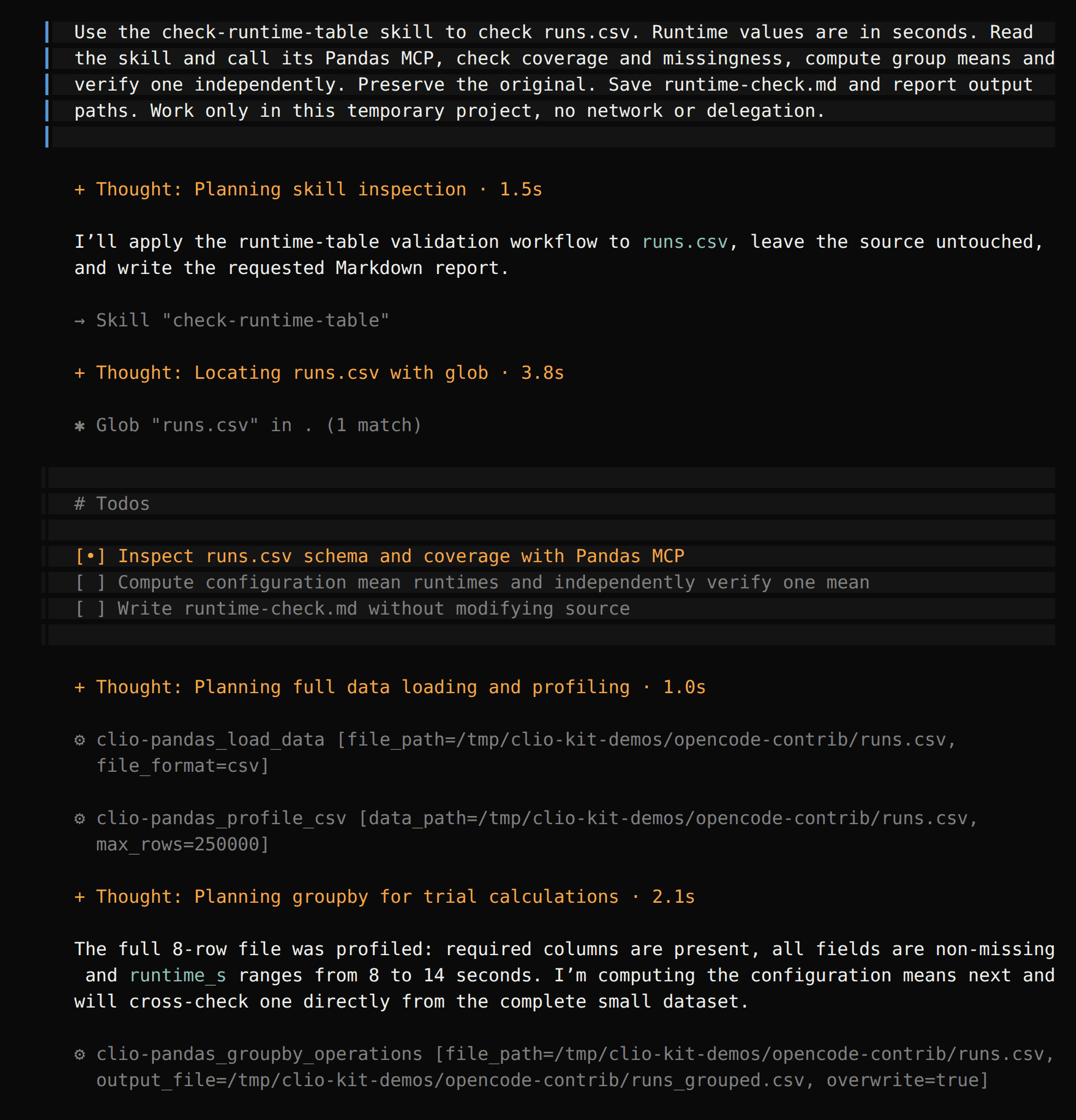
Use the check-runtime-table skill to check runs.csv. Runtime values are in seconds. Read the skill and call its Pandas MCP, check coverage and missingness, compute group means and verify one independently. Preserve the original. Save runtime-check.md and report output paths. Work only in this temporary project, no network or delegation.
5. Check the outputs
In each project:
cat runtime-check.md
ls *.csv
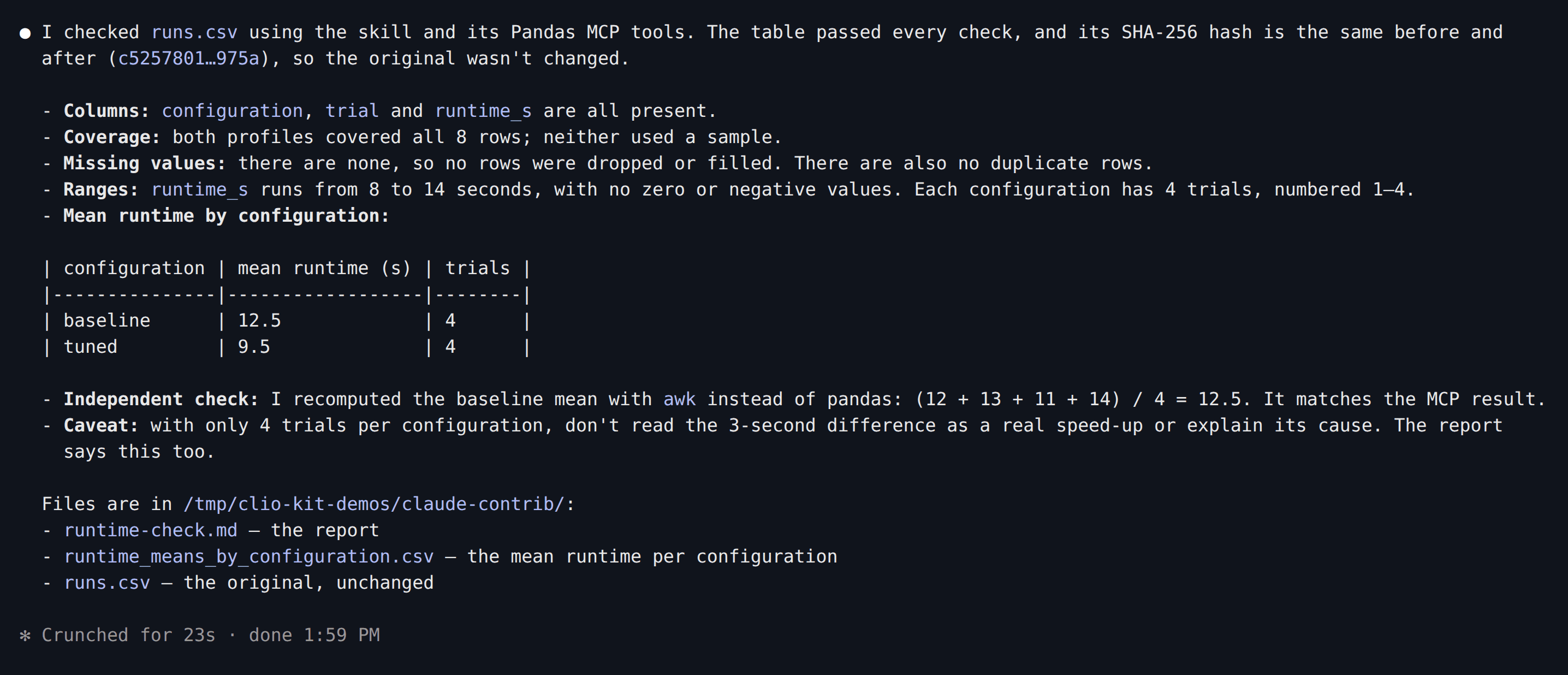
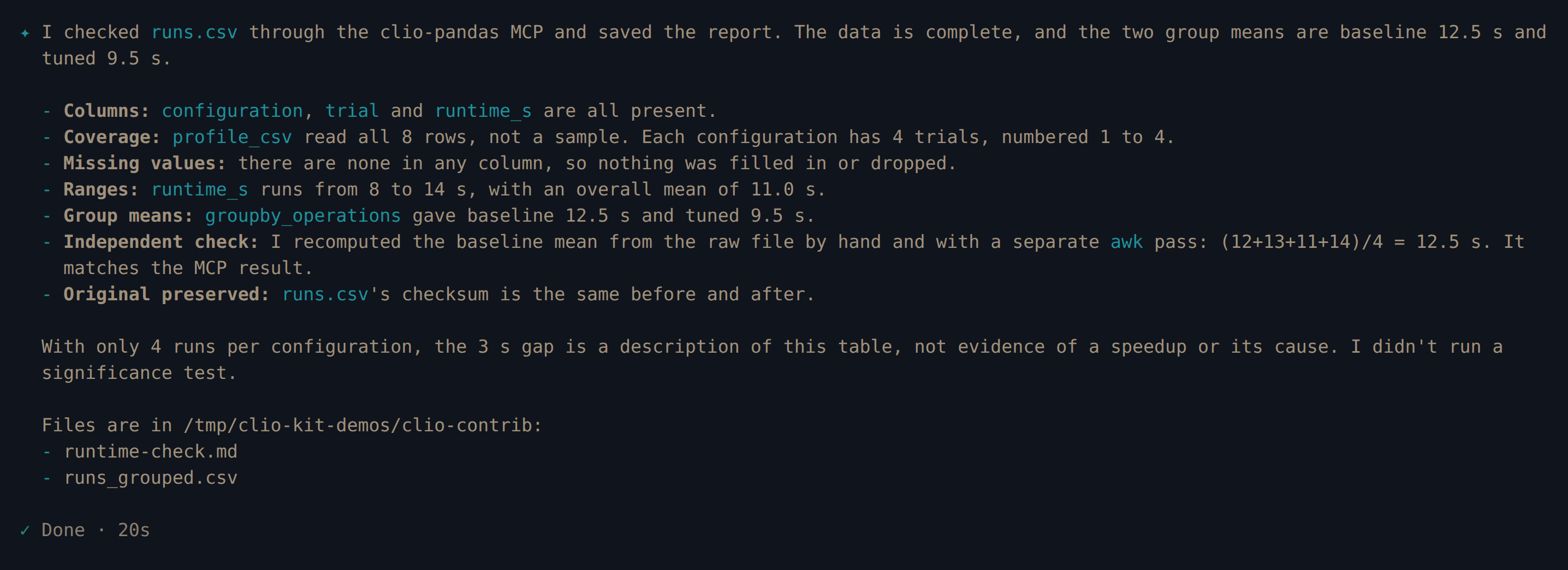
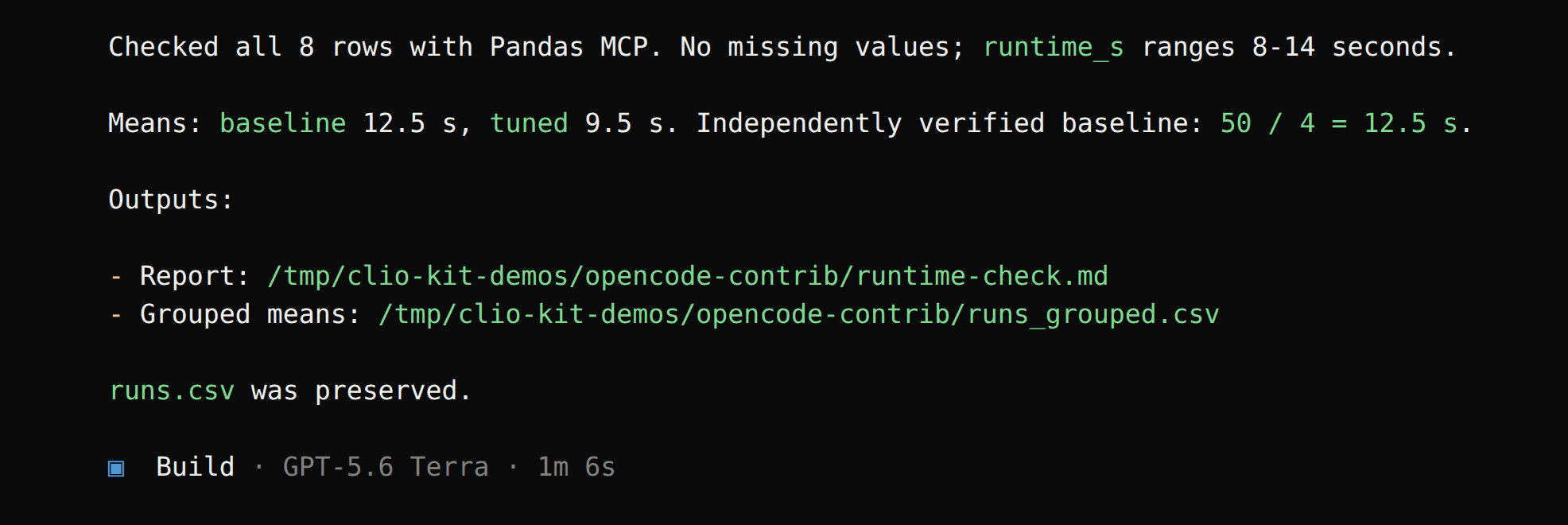
All four sessions found 8 rows, no missing values, and means of 12.5 seconds
for baseline and 9.5 seconds for tuned. The grouped file is
runs_grouped.csv in the Codex, Clio Coder and OpenCode runs and
runtime_means_by_configuration.csv in the Claude Code run; open the path your
agent reports. We checked each grouped CSV and confirmed every original
runs.csv was unchanged. The report should state units and coverage without
claiming a real performance improvement from this fixture.
The included missing-column scenario is an additional test to run when adapting the package; the screenshots above demonstrate the complete-input case.
6. Choose a contribution route
Maintained here: put your reviewed package in plugins/<name>/ in the CLIO Kit
checkout and open a repository PR. Website builds and CI discover valid folders
and update the catalogue. Skills, agents and hooks have corresponding package
folders; see contribution routes.
Maintained in your own repository: follow the community steps below. CLIO Kit indexes one entry; your implementation, dependencies and releases stay with you.
7. Prepare a community entry
Publish the contents of plugins/lab-checks/ in your own repository, with
.claude-plugin/plugin.json at its root. Include the .mcp.json and skills/
directory, a license and installation instructions. Replace the tutorial author
with your name and rerun the validation and usage checks above.
Use your real GitHub repository in place of your-org/lab-checks:
clio-kit plugin submit plugins/lab-checks \
  --repo your-org/lab-checks --output lab-checks.toml
cat lab-checks.toml
The entry contains your manifest's name, description and maintainer, followed by:
[source]
type = "github"
repo = "your-org/lab-checks"
This command validates the local package and writes a file. It does not publish
your code, check that the remote matches it, or open a PR. Confirm the published
repository includes the files you tested. The entry filename must match its
name; community names cannot start with the reserved clio- prefix.
If you keep the package inside a larger repository instead, replace the source table with its actual subdirectory:
[source]
type = "git-subdir"
url = "https://github.com/your-org/your-repo.git"
path = "plugins/lab-checks"
See the community source formats
for npm plugin packages, Git URLs and revision pinning. An npm MCP executable
alone needs a plugin wrapper with .mcp.json before it can use this route.
8. Submit the entry for review
In your CLIO Kit fork, add the reviewed file as
community/entries/lab-checks.toml and open a PR against iowarp/clio-kit.
Only the entry belongs in that PR; the plugin stays in your repository. Catalogue
generation runs automatically during the build and CI.
For a plugin at the root of a GitHub repository, you can alternatively let the
CLI create the submission. Sign in with gh auth login, then run:
clio-kit plugin submit plugins/lab-checks \
  --repo your-org/lab-checks --open-pr
This command creates or uses your GitHub fork, pushes a new branch and opens a public PR. It generates a fresh GitHub entry; use the manual route if you edited the source table or added a revision pin. Neither route merges the contribution.
Include the installation route, client versions, inputs, output checks and limitations in your PR. Keep model credentials and local session directories out of the contribution. Review covers the entry and a minimal installation/usage check; indexing does not certify every external command or future release.
9. Install the accepted contribution
After your entry is merged and available in the catalogue, Claude Code users register the marketplace once, then install your plugin:
claude plugin marketplace add iowarp/clio-kit
claude plugin install lab-checks@clio-kit
If the marketplace is already registered, run claude plugin marketplace update clio-kit before installing. Reload plugins or restart Claude Code, then repeat
the runtime-table request from step 4 and check the outputs from step 6.
This example still requires the CLIO Kit launcher for its Pandas MCP.
When you publish an update, bump the plugin manifest version. Existing users run:
claude plugin marketplace update clio-kit
claude plugin update lab-checks@clio-kit
Reload the plugin after updating. These are native Claude Code installation commands. Kit also installs indexed packages through the shared project installer; agents and hooks need an adapter for the selected host. For Codex, follow the local component installation in step 5 using the tutorial's local index, or provide your own client-specific instructions.
Contribute a whole marketplace
If you maintain a collection, submit its index instead of each plugin:
clio-kit plugin submit /path/to/your-marketplace \
  --repo your-org/your-marketplace --kind marketplace \
  --output your-marketplace.toml
It needs .claude-plugin/marketplace.json with metadata.description. Submit the
generated entry under the filename reported by the command. Maintainers refresh
the federated catalogue to include its plugins; the implementations remain in
your repository. See marketplace federation
for refresh behavior and conflict handling.
The recorded sessions above demonstrate local plugin usage. The community steps
describe publishing your own contribution; this tutorial does not claim that
your-org/lab-checks exists or that the example has been accepted into CLIO Kit.